SMS Opt-In & Consent Flow for QCall
This page documents the SMS consent flow for QCall, a product of Clear Tech Solutions LLC. It explains how users opt in to receive text messages, what messages they receive, and how to opt out.
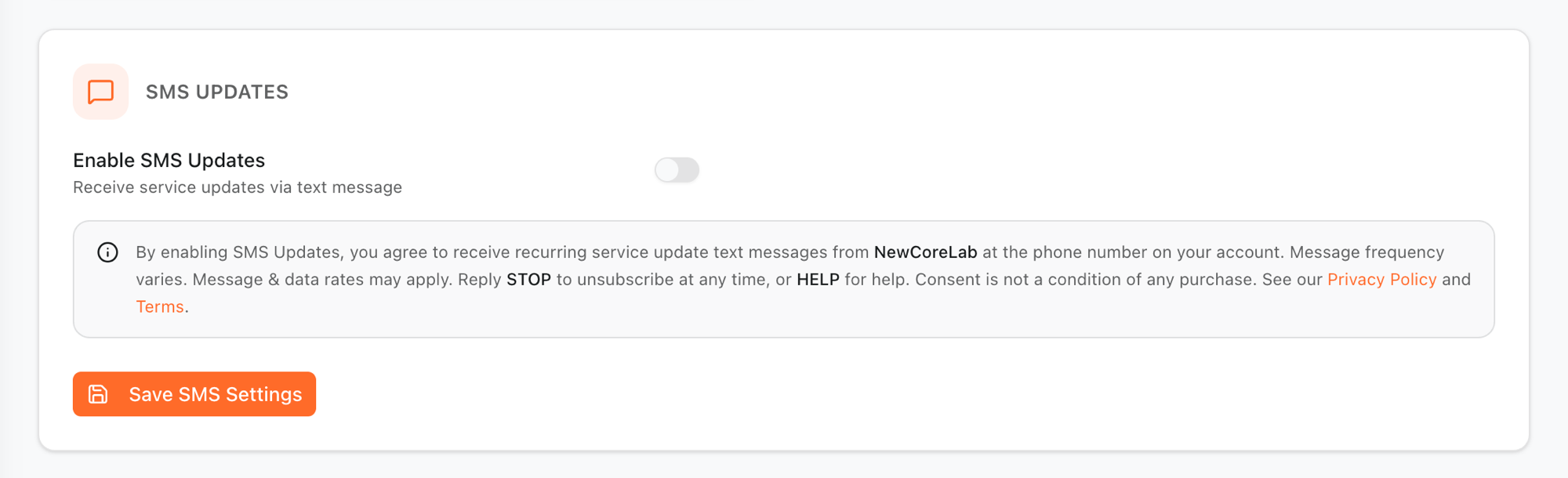
Opt-in occurs within authenticated QCall account settings. The consent screen and language are shown below for verification purposes.
In-app consent screen
Consent language
When enabling SMS Updates, users explicitly agree to the following consent statement, shown next to the opt-in toggle:
“By enabling SMS Updates, you agree to receive recurring service update text messages from NewCoreLab at the phone number on your account. Message frequency varies. Message & data rates may apply. Reply STOP to unsubscribe at any time, or HELP for help. Consent is not a condition of any purchase. See our Privacy Policy and Terms.”
NewCoreLab (QCall) is operated by Clear Tech Solutions LLC.
Message type
QCall sends transactional status updates only. These messages relate to the status of a user's own requests and account activity. QCall does not send marketing or promotional text messages.
Message frequency
Messages are recurring. Frequency varies by account activity — a user receives a message when the status of one of their requests changes, so volume depends on how many active requests they have.
Sample messages
- QCall: Your request #1234 status changed to In Progress. Reply STOP to opt out.
- QCall: Request #1234 is now Completed. Reply STOP to opt out, HELP for help.
- QCall: A new update was added to request #1287. Reply STOP to opt out.
Opt-out & help
Users can opt out of SMS messages at any time by replying STOP to any message. After replying STOP, the user receives a single confirmation message and no further texts are sent unless they opt in again.
For assistance, users can reply HELP to any message to receive support information, or contact us at support@newcorelab.com. Message & data rates may apply.
Policies
Phone numbers and user data are never shared or sold to third parties for marketing. For details, see our Privacy Policy and Terms of Service.